IconFontsImageList VCL & FMX contains four Delphi components that operate on both VCL and FMX. These components simplify the process of working with icon fonts as images through enhanced efficiency. You can adopt icon fonts as your application images while abandoning traditional image file usage. THE components function optimally with high-DPI displays through GDI+ rendering, which delivers superior visual quality.
The tools make displaying icons through their controls possible, whether you handle a single-form app or manage a multi-form application. They allow you to control size, color, and icon transparency effortlessly. The tools also enable you to create image collections and virtual image lists and let you place font icons directly on forms.
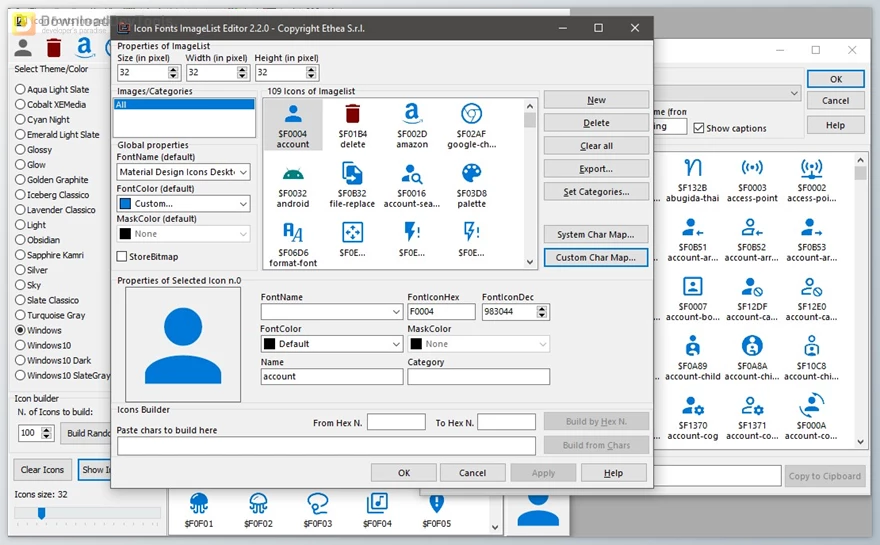
Key Features of IconFontsImageList VCL & FMX :
- High-DPI Support: Ensures icons look sharp and clear on all screen resolutions, including 4K and Retina displays.
- GDI+ Rendering Optimization: Icons are rendered using GDI+, which provides better anti-aliasing and smooth visual output.
- TIconFontsImageCollection (VCL only): Lets you create a central collection of icon fonts that can be reused across multiple components.
- TIconFontsVirtualImageList (VCL only): A virtual image list that links to the image collection, allowing dynamic resizing and color changes of icons without duplicating image data.
- TIconFontImage (VCL & FMX): An extended image component that displays a single icon font directly on a form with options like stretch, opacity, and color.
- TIconFontsImageList (VCL & FMX): A simple and lightweight image list ideal for single-form applications that need basic icon font functionality like resizing and color adjustment.
Click on the links below to Download the latest version of IconFontsImageList VCL & FMX Retail Version!

Note Download speed is limited, for download with higher speed (2X) please register on the site and for download with MAXIMUM speed please join to our VIP plans.

Discover free tools, limited-time offers, and stay updated with the latest software we release.


You are replying to :