
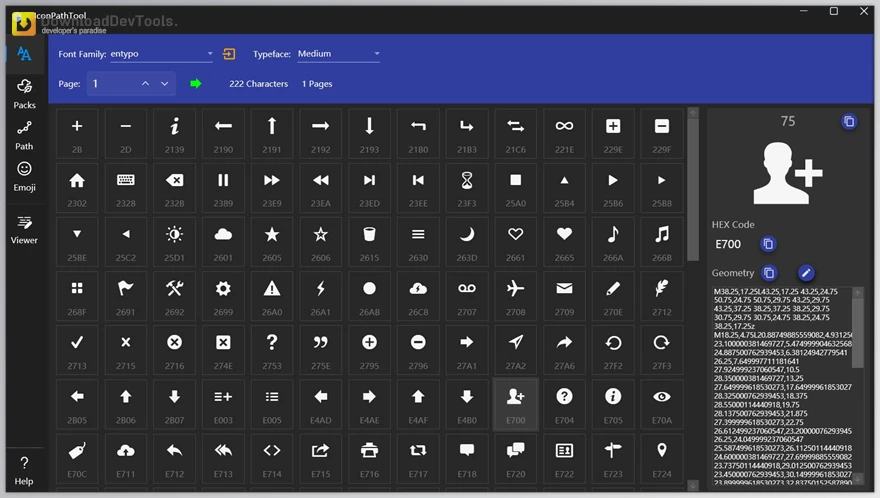
IceSky IconPathTool is a simple program that provides access to tens of thousands of icons and allows you to manipulate their geometric path data to work with their geometric path data. As a designer or a developer, you can have a look at the way each icon is constructed, edit the code of the vector path, and save it in the form of an image or SVG. XAML development is also made possible with the tool, which makes it suitable for creating the custom UI elements of Windows applications.
The IceSky IconPathTool does not just involve any basic icon browsing, but gives you an opportunity to view icon fonts, see all the characters within a font file, and even make emojis out of geometric paths. Editing has just become more powerful with the newest update, having such new options as rotate and flip. All in all, it is a versatile tool that any person who works with vectors, icons, or UI elements may need.
Key Features of IceSky IconPathTool:
- View Icon Fonts – Browse through large collections of icon fonts and inspect them visually.
- Convert Icons to Geometric Paths – Transform icons into editable vector path code for customization or development use.
- View Characters in Font Files – See every symbol stored inside a font file, not just icons.
- View Emojis and Convert to Paths – Load emojis and automatically convert them into vector shapes.
- Preview, Edit, and Export Paths – Modify geometric paths and save your results as SVG or standard image files.
Click on the links below to Download the latest version of IceSky IconPathTool Retail Version!

Note Download speed is limited, for download with higher speed (2X) please register on the site and for download with MAXIMUM speed please join to our VIP plans.

Discover free tools, limited-time offers, and stay updated with the latest software we release.















You are replying to :