
The SysProgs VisualKernel is much easier to develop through visual kernel development, where you can even write the code in Visual Studio instead of the command-line tools that are very cumbersome. You can write, load, and debug kernel modules, set breakpoints, examine variables, and call the stack just like you would a normal application. It also provides numerous connection option,s including virtual machines, network debugging, serial ports, JTA,G and common embedded boards and can therefore debug desktop kernels and hardware.
SysProgs VisualKernel has a Live Tracing feature in case it is not feasible to interrupt the entire system during debugging. This will allow you to capture the values of certain variables as the kernel continues to run, which is highly useful when tracking timing problems or bugs that only occur under a realistic workload. You also use printk() messages in real time within Visual Studio, so there is no need to use a separate logging tool.
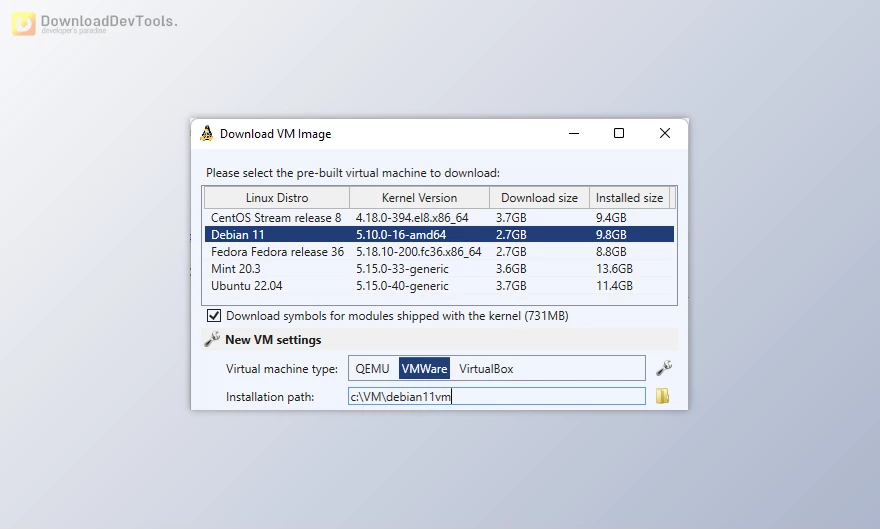
Setup is mostly automatic. SysProgs VisualKernel can fetch and set the appropriate kernel sources, headers, and symbols, configure KGDB, and prepare a debugable environment on your behalf. It goes so far as to offer ready-built virtual machine images and indexed code to pull up and navigate quickly. IntelliSense is aware of the Linux KBuild system, and thus can be used to rapidly search, jump to definitions, and navigate the kernel codebase without configuration.
Key Features of SysProgs VisualKernel:
- Visual Studio kernel debugging – Debug kernel modules with breakpoints, watches, and call stacks in a familiar UI.
- Multiple debug connections – Works with VMs, network (KGDBoE), serial/COM, JTAG, and supported embedded boards.
- Live Kernel Tracing – Monitor variable values while the kernel keeps running, without pausing the system.
- Prebuilt debug VM images – Ready-to-use kernels with symbols and indexed sources to avoid long setup.
- Embedded device support – Direct debugging for Raspberry Pi, Zynq, etc.MX6 and similar boards with multicore support.
- Automatic symbol handling – No need to track module load addresses; works even with KASLR enabled.
- Accurate IntelliSense from KBuild – Fast search, code navigation, and definition lookup across the kernel.
- Kernel source integration – Open source files from the call stack and set breakpoints inside kernel code.
- Real-time printk viewer – View kernel log output directly inside Visual Studio.
- Automated environment setup – Downloads kernel sources, headers, configures KGDB, and indexes modules automatically.
Click on the links below to Download the latest version of SysProgs VisualKernel with Keygen!

Note Download speed is limited, for download with higher speed (2X) please register on the site and for download with MAXIMUM speed please join to our VIP plans.

Discover free tools, limited-time offers, and stay updated with the latest software we release.



![FREE Download DevExpress Universal Complete [.Net Components] v26.1.3.26179 (18 Jun 2026) + Documentation + Patcher](https://downloaddevtools.com/filemanagercontent/files/1/prolistnormal/124-banner.png)







You are replying to :