Gitfox is the native Mac client for Git, designed to make it quicker and easier for developers to manage repositories. It aims to simplify various aspects of Git like reviewing code changes, committing, staging, branching, and conflict resolution.
The app is particularly helpful for those developers that prefer to have greater control than just from the command line. It seamlessly integrates with GitHub, GitLab, and Bitbucket cloud repositories, allows you to explore your commit history, and provides features such as interactive rebase, bisect, reflog, and granular staging.
In addition, Gitfox works on making macOS user experience smooth. It's clean, feels native, has keyboard shortcuts, drag-and-drop capabilities, and is compatible with common merge applications. So, it is a good option for Mac users who desire to have a beautiful and powerful Git app with a robust set of features.
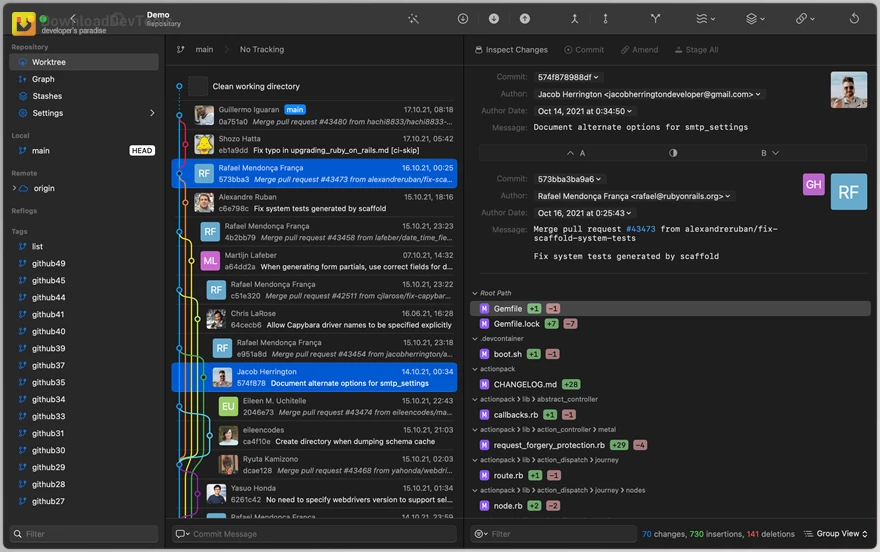
Key Features of Gitfox :
- Cloud repository support — Create, list, and clone repositories from GitHub, GitLab, and Bitbucket.
- Full-text search — Search inside source files across your commit history.
- Granular staging — Stage single lines, selected changes, or complete hunks before committing.
- Interactive rebase — Edit, reword, drop, fix up, or squash commits with simple actions.
- Git bisect — Find problematic commits by stepping through changes from any commit.
- Reflog access — Recover lost commits or review previous Git states when something goes wrong.
- Conflict resolution — Resolve merge conflicts easily by choosing one side or the other.
- Multiple identities — Create and switch between different committer identities when needed.
- Command-line integration — Open Gitfox directly from the terminal using its command-line tool.
- Drag-and-drop workflow — Move commits, branches, and tags using simple drag-and-drop actions.
- Markdown preview — View repository README files with clean Markdown rendering.
- Notifications — Fetch repositories in the background and get alerts when changes are found.
- Quick actions — Use the ⌘P command palette to quickly search and run actions.
- Merge tool support — Works with tools like Kaleidoscope, Visual Studio Code, Araxis Merge, Meld, P4Merge, Beyond Compare, and FileMerge.
- Native Mac design — Built as a fully native macOS app with a clean and polished interface.
Click on the links below to Download the latest version of Gitfox with CRACK !
 Gitfox v4.5.2 for macOS + CRACK.rar (سایز: 43.0 MB - تاریخ: 22/04/1405 09:38:45 ق.ظ)
- Gitfox v4.4.0 for macOS + CRACK.rar (سایز: 38.3 MB - تاریخ: 09/04/1405 11:46:33 ق.ظ)
- Gitfox v4.3.2 for macOS + CRACK.rar (سایز: 38.0 MB - تاریخ: 02/04/1405 10:58:16 ق.ظ)
- Gitfox v4.1.6 for macOS + CRACK.rar (سایز: 37.6 MB - تاریخ: 04/03/1405 01:21:46 ب.ظ)
Note Download speed is limited, for download with higher speed (2X) please register on the site and for download with MAXIMUM speed please join to our VIP plans.

Discover free tools, limited-time offers, and stay updated with the latest software we release.

در حال پاسخ به :