CloudMounter allows you to mount your cloud drives to Windows, just like they were physically present drives. You can just mount your cloud accounts, such as Google Drive, Dropbox, OneDrive, Amazon S3, WebDAV, or even an FTP/SFTP server, and operate with all of them in File Explorer. It would be as though your files on the cloud were your own part of the PC, but without occupying disk space.
The software is convenient and security-oriented. It is possible to transfer files across services within different clouds without storing them on disk, and all the data is secured by a robust AES-256 client-side encryption. This will make sure that your confidential data remains secure and can only be decrypted using a special decryption key that only you possess. Due to its integration with File Explorer, the use of cloud files will be entirely natural.
CloudMounter also has an option for unlimited cloud accounts and consumes the smallest amount of system resources, so you can have many connections to the same account at the same time without slowing down your PC. You can edit, copy, upload, delete, or organize your online files just like any other ordinary folder. It is a single-stop solution that makes cloud storage management easier and more organized to maintain a fast and uncluttered workflow.
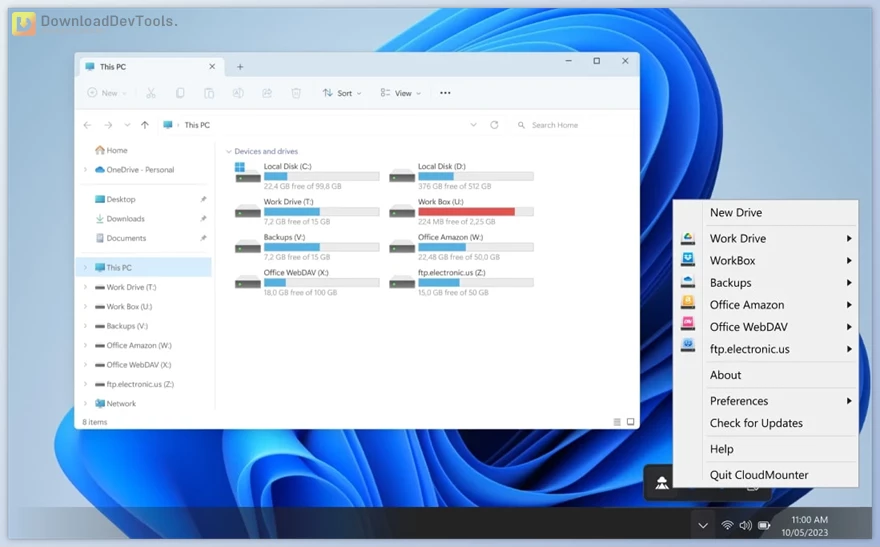
Key Features of CloudMounter:
- Multi-Cloud Management – Transfer or organize files between different cloud services without downloading them to your computer.
- Client-Side AES-256 Encryption – Protects your cloud data by encrypting it locally before it’s sent online, ensuring only you can decrypt it.
- File Explorer Integration – Lets you use cloud files through Windows’ native file manager, making all operations feel familiar and easy.
- Unlimited Cloud Accounts – Connect and manage as many cloud services as you want at the same time without performance issues.
- Minimal Resource Usage – Opens and edits files directly in the cloud, helping save local disk space and reducing unnecessary syncing.
- Work with Cloud Files Like Local Files – Perform everyday actions such as copying, editing, uploading, deleting, or creating new files directly from File Explorer.
- Wide Service Support – Works with Google Drive, Dropbox, OneDrive, Amazon S3, WebDAV, MEGA, Box, FTP, SFTP, and FTPS servers.
- SFTP/FTP Mounting – Mount remote servers as local drives, allowing fast and simple file transfers just like working with local folders.
Click on the links below to Download the latest version of CloudMounter with CRACK!

Note Download speed is limited, for download with higher speed (2X) please register on the site and for download with MAXIMUM speed please join to our VIP plans.

Discover free tools, limited-time offers, and stay updated with the latest software we release.










You are replying to :