
ASM Visual Pro functions as a strong and convenient programming environment that specializes in assembly language development work. From its outset, ASM Visual Pro delivers support for MASM, FASM, and TASM assemblers, which allows users to start coding immediately without extensive setup obligations. The integrated tools inside this environment enable small programs and complex system development with improved organization and efficiency.
The debugging process becomes straightforward because of the support of third-party debugging tools, including WinDbg, OllyDbg, and x64dbg. Some project types allow ASM Visual Pro users to benefit from its simple debugger tool, which users find easy to navigate. The program enables easy reading and writing of assembly code through its fascinating syntax highlighting system that automatically provides smart code recommendations to users, including those new to coding.
ASM Visual Pro features sophisticated capabilities, including project organization tools, code refactoring remedies, and code complexity evaluation systems. The interface displays error locations in a list and allows you to instantly access problematic code segments directly from the list.
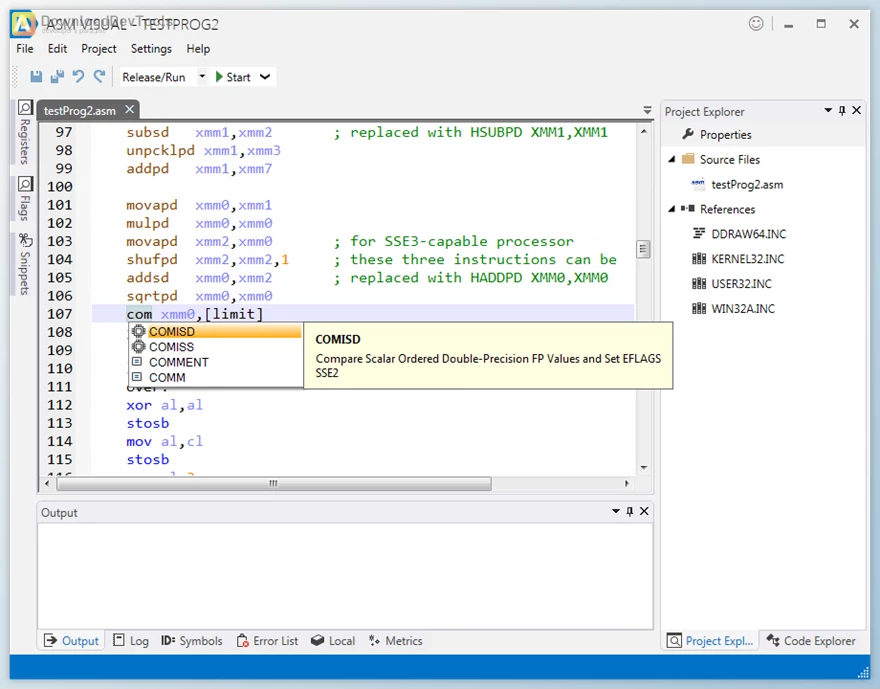
Key Features of ASM Visual Pro :
- Built-in Compiler Support: Supports MASM, FASM, and TASM without extra configuration, so you can start building your assembly code immediately.
- Third-party & Built-in Debugging: Compatible with powerful debuggers like WinDbg, OllyDbg, TD, and x64dbg. Also includes an easy-to-use internal debugger for supported projects.
- Syntax Highlighting & Code Completion: Highlights keywords with color and gives suggestions as you type, making your code easier to read and write.
- Project-Based Structure: Each project is a self-contained unit with its own settings and files, making it easy to share or move between computers.
- Refactoring Tools: Rename variables or functions across your entire project with one click, or extract parts of your code into separate procedures for better organization.
- Code Complexity Metrics help you measure the complexity of your code, which can be useful for planning and maintaining larger projects.
- Snippets Panel: Save frequently used code blocks and drag them into your project whenever needed, saving time and reducing errors.
- Clear Error Messages: Shows all compiler errors in a list. Click on any item to go directly to the line of code that caused the problem.
Click on the links below to Download the latest version of ASM Visual Pro with CRACK!

Note Download speed is limited, for download with higher speed (2X) please register on the site and for download with MAXIMUM speed please join to our VIP plans.

Discover free tools, limited-time offers, and stay updated with the latest software we release.









1/20/2021 3:25:09 PM
uhhh what happened to the files to download?! I was really wanting to grab this.
Dear user, thank you for your comment, file has been uploaded
1/20/2021 2:49:16 PM
uhhh what happened to the files to download?! I was really wanting to grab this.
You are replying to :