O&O DiskCommander is an intelligent analysis and cleanup application that allows one to know precisely what is consuming space on your drives. It does not require one to search manually in the folders, but presents clear lists and visual charts that show large files, oversized folders, old projects, forgotten downloads, and other storage hogs. It is easy to choose what to keep, relocate, archive, or delete to free up more space and not have to purchase extra storage.
The O&O DiskCommander is easy to use, and at the same time, it is professional. Its interface is also familiar due to its reliance on Windows Explorer, but it gets much deeper in its analysis of disks, partitions, and file systems such as NTFS and FAT. It can also be used in a safe, analysis-only state where no data is altered. This renders it appropriate not just to home users cleaning up the space but also IT tasks like diagnostics, troubleshooting, and explaining complex storage structures.
One of the clear strengths is the ability to analyze O&O DiskImage backup files directly. You are also able to access the contents of the backup images similar to normal drives and see without the need to restore them, which saves time and storage. O&O DiskCommander also identifies duplicate files, allows a batch operation across multiple folders and drives, records the actions when it is necessary, and can remind you when you run out of storage. It is compatible with local drives and external devices as well as with network storage, and is optimized to be used with modern Windows systems.
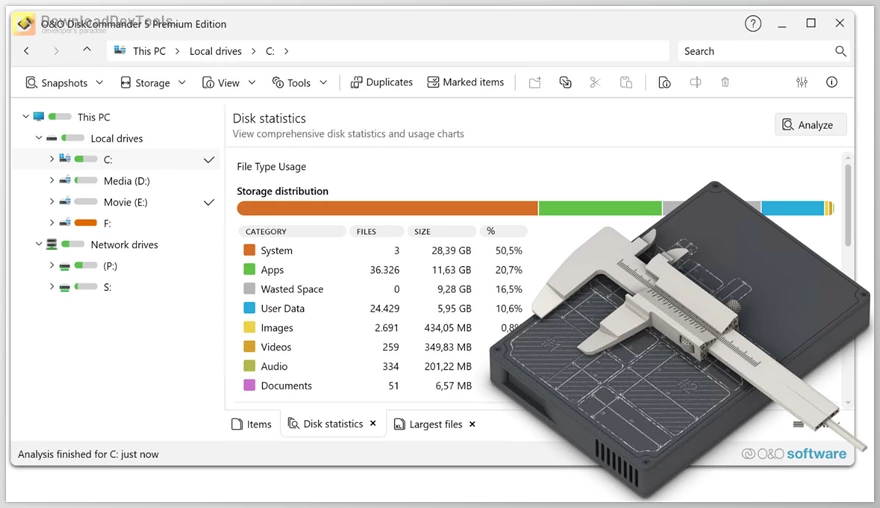
Key Features of O&O DiskCommander:
- Disk usage visualization – Shows storage consumption using clear lists and charts so you can instantly spot large files and folders.
- Explorer-style interface – Familiar layout makes navigation easy without a learning curve.
- Deep storage analysis – Examines drives, partitions, and file systems (e.g., NTFS, FAT) for detailed insights.
- Analysis-only mode – Allows safe inspection of disks without modifying any data.
- Backup image analysis – Opens and analyzes O&O DiskImage backups without restoring them.
- Duplicate file detection – Finds redundant files to reduce clutter and recover wasted space.
- Direct cleanup actions – Move, copy, or delete files straight from the analysis view.
- Batch processing – Perform operations on multiple files and folders across different drives in one step.
- Operation logging – Records file actions for tracking and documentation.
- Storage threshold alerts – Warns you when disk usage reaches defined limits.
- Works across environments – Supports local drives, external storage, and network locations.
- Modern Windows support – Compatible with Windows 10, Windows 11, and Windows Server editions.
Click on the links below to Download the latest version of O&O DiskCommander with CRACK!
 O&O DiskCommander Premium v5.1.1020 for Win x64 Multilingual Portable Edition.rar (سایز: 76.4 MB - تاریخ: 18/11/1404 10:28:09 ق.ظ)
- O&O DiskCommander Premium v5.1.1020 for Win x64 Multilingual + CRACK.rar (سایز: 64.8 MB - تاریخ: 18/11/1404 10:28:08 ق.ظ)
- O&O DiskCommander Premium v5.0.1018 for Win x64 Multilingual + CRACK.rar (سایز: 64.8 MB - تاریخ: 08/11/1404 10:16:01 ق.ظ)
Note Download speed is limited, for download with higher speed (2X) please register on the site and for download with MAXIMUM speed please join to our VIP plans.

Discover free tools, limited-time offers, and stay updated with the latest software we release.








در حال پاسخ به :