
The Charles Web Debugging Proxy Application is one tool that helps you view what is happening between the computer and the internet. It presents you with every request and response with details such as cookies, headers, and caching details. Charles will even decrypt the secure HTTPS traffic, enabling you to see what your apps and websites are talking to each other on the internet.
This sets it as a vital instrument for developers who may be required to test, debug, and optimize their applications. Charles offers built-in options to mimic a typical slower network, monitor downloads, and configure behavior, thus saving you time by allowing you to recognize and solve problems quickly.
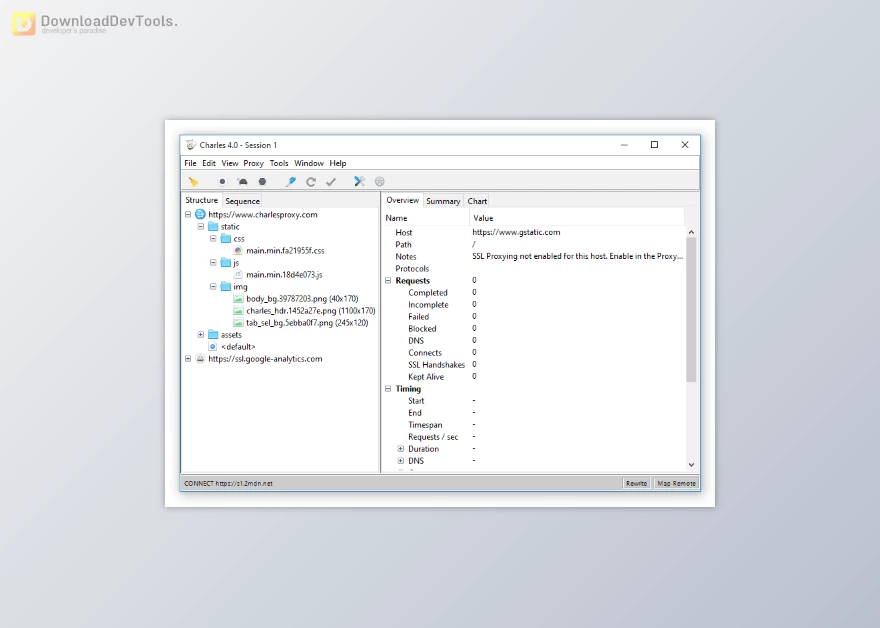
Key Features of Charles Web Debugging Proxy Application:
- Traffic Recording: Logs all HTTP and HTTPS communication for easy analysis.
- Full Request & Response Details: View cookies, headers, and content in real time.
- SSL/HTTPS Support: Decrypts secure traffic for complete visibility.
- Debugging Made Easy: Spot errors and bugs faster with a clear traffic breakdown.
- Network Simulation: Test apps under slow or unreliable internet conditions.
- Download Statistics: Monitor file transfers and bandwidth usage.
- Highly Configurable: Adjust settings to match your workflow and testing needs.
Click on the links below to Download the latest version of Charles Web Debugging Proxy Application with CRACK!
 Charles Web Debugging Proxy Application v5.2.0 (13 Jun 2026) for Windows + Keygen.rar (سایز: 81.2 MB - تاریخ: 31/03/1405 12:02:59 ب.ظ)
- Charles Web Debugging Proxy Application v5.1.0 (21 Apr 2026) for Windows + Keygen.rar (سایز: 81.0 MB - تاریخ: 01/02/1405 11:19:45 ق.ظ)
- Charles Web Debugging Proxy Application v5.0.3 (20 Sep 2025) for Windows + Keygen.rar (سایز: 73.6 MB - تاریخ: 02/09/1404 01:04:26 ق.ظ)
- Charles Web Debugging Proxy Application v5.0.2 (09 Aug 2025) for Windows + Keygen.rar (سایز: 68.0 MB - تاریخ: 02/09/1404 01:04:20 ق.ظ)
Note Download speed is limited, for download with higher speed (2X) please register on the site and for download with MAXIMUM speed please join to our VIP plans.

Discover free tools, limited-time offers, and stay updated with the latest software we release.












در حال پاسخ به :