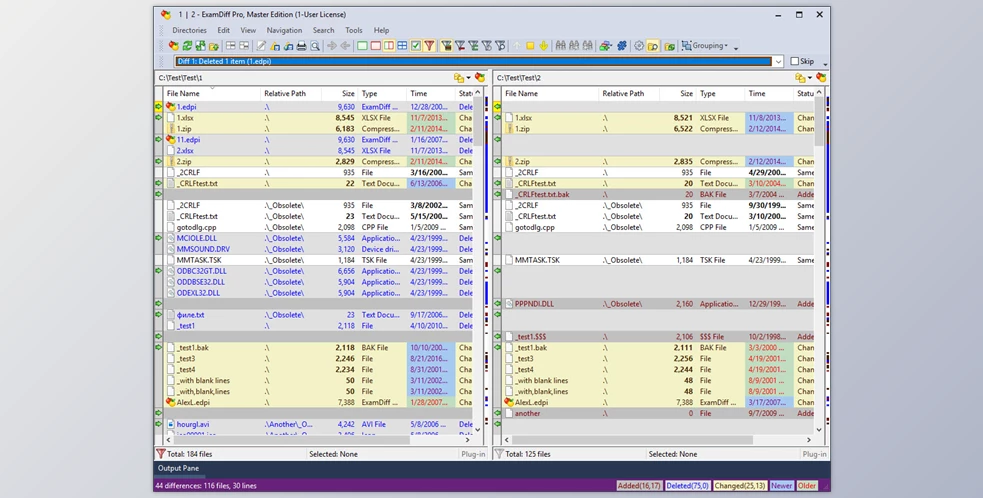
ExamDiff Pro Master Edition is a comprehensive file and directory comparison tool designed for developers, regular computer users, testers, and writers alike. It simplifies tracking changes in files and folders, conducting code reviews, and effortlessly merging different versions of files using two- and three-way diff and merge capabilities. With support for various file types, including source code, Office documents, and binary files, ExamDiff Pro Master Edition offers a versatile solution for comparing and synchronizing data across different platforms.
Its user-friendly interface and customizable features make it stand out among other comparison utilities. For developers, ExamDiff Pro Master Edition facilitates code reviews by visualizing code structure through syntax highlighting and allowing the comparison of executable files with built-in binary comparison. For regular computer users, ExamDiff Pro Master Edition offers quick navigation through differences, synchronization of files between PC and external media, and the ability to create directory snapshots for future comparison and archiving. Additionally, testers can validate test results, and writers can compare Word, Excel, and PDF documents using built-in plug-ins.
Key Features of ExamDiff Pro Master Edition :
- Track changes in files and folders
- Perform code reviews
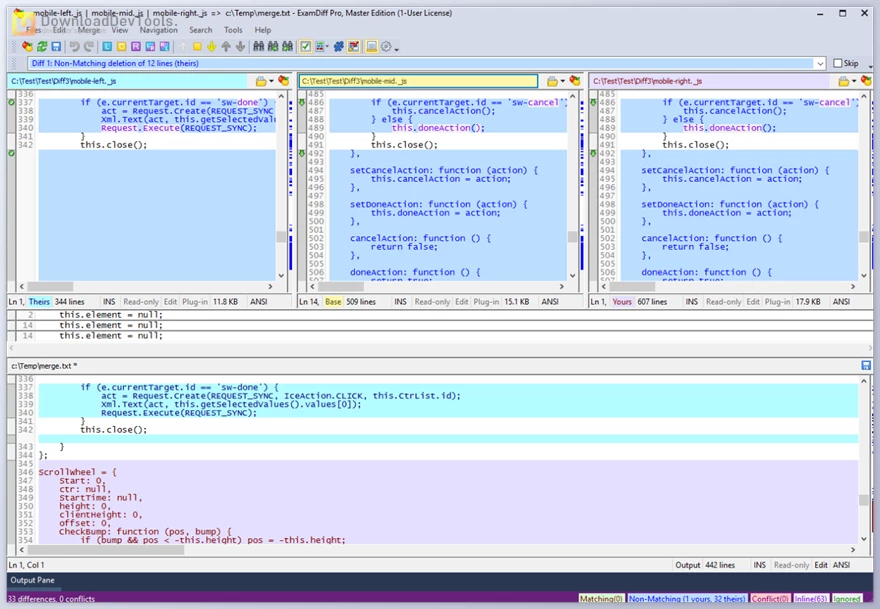
- Easily merge different versions of files using two- and three-way diff and merge
- Share HTML and printed difference reports with colleagues
- Compare a local website to an FTP server using the FTP plug-in
- Ignore programming language comments to focus on important aspects of the source code
- Visualize code structure through syntax highlighting
- Compare executable files (DLLs, EXEs, etc.) using built-in binary comparison
- Quickly navigate through differences
- Synchronize files and directories between your PC and external media
- Create directory snapshots for future comparison and archiving
- Quickly find and undo mistakes by comparing files with previous versions
- Easily drag and drop files and directories
- Compare from Windows Explorer using the built-in Shell extension
- Validate test results by comparing them with a baseline
- Save test comparison results into reports
- Edit documents within the comparison window using the built-in text editor
- Use synchronized word wrap to compare document paragraphs
- Compare Word, Excel, and PDF documents using plug-ins
Click on the links below to Download the latest version of ExamDiff Pro Master Edition with Keygen!
- OLD (0 B - 9/22/2026 5:58:49 PM)
 ExamDiff Pro Master Edition v17.0.1.4 for Win x86 & x64 Portable Edition.rar (Size: 73.3 MB - Date: 7/15/2026 10:23:43 AM)
- ExamDiff Pro Master Edition v17.0.1.4 for Win x86 & x64 + Keygen.rar (Size: 47.1 MB - Date: 7/8/2026 12:51:22 PM)
- ExamDiff Pro Master Edition v17.0.1.1 for Portable Edition.rar (Size: 60.4 MB - Date: 6/28/2026 11:18:13 AM)
- ExamDiff Pro Master Edition v17.0.1.2 for Win x86 & x64 + Keygen.rar (Size: 47.1 MB - Date: 6/23/2026 11:09:16 AM)
- ExamDiff Pro Master Edition v17.0.1.1 for Win x86 & x64 + Keygen.rar (Size: 47.1 MB - Date: 6/16/2026 11:30:08 AM)
- ExamDiff Pro Master Edition v17.0.1 for Win x86 & x64 + Keygen.rar (Size: 47.1 MB - Date: 6/10/2026 11:23:54 AM)
- ExamDiff Pro Master Edition v17.0.1 for Portable Edition.rar (Size: 59.6 MB - Date: 6/9/2026 11:01:57 AM)
- ExamDiff Pro Master Edition v16.0.1.22 for Portable Edition.rar (Size: 43.5 MB - Date: 6/3/2026 11:49:34 AM)
- ExamDiff Pro Master Edition v16.0.1.23 for Win x86 & x64 + Keygen.rar (Size: 43.6 MB - Date: 5/26/2026 1:21:13 PM)
- ExamDiff Pro Master Edition v16.0.1.22 for Win x86 & x64 + Keygen.rar (Size: 43.6 MB - Date: 2/18/2026 11:44:36 AM)
- ExamDiff Pro Master Edition v16.0.1.21 for Portable Edition.rar (Size: 43.2 MB - Date: 2/10/2026 1:08:50 PM)
- ExamDiff Pro Master Edition v16.0.1.21 for Win x86 & x64 + Keygen.rar (Size: 43.3 MB - Date: 2/9/2026 11:39:46 AM)
- ExamDiff Pro Master Edition v16.0.1.18 for Portable Edition.rar (Size: 43.4 MB - Date: 2/2/2026 12:15:45 PM)
- ExamDiff Pro Master Edition v16.0.1.20 for Win x86 & x64 + Keygen.rar (Size: 42.2 MB - Date: 2/1/2026 11:10:20 AM)
- ExamDiff Pro Master Edition v16.0.1.18 for Win x86 & x64 + Keygen.rar (Size: 22.1 MB - Date: 1/21/2026 10:49:48 AM)
- ExamDiff Pro Master Edition v16.0.1.17 for Portable Edition.rar (Size: 53.4 MB - Date: 12/30/2025 10:38:02 AM)
- ExamDiff Pro Master Edition v16.0.1.17 for Win x86 & x64 + Keygen.rar (Size: 40.8 MB - Date: 12/23/2025 12:50:11 PM)
- ExamDiff Pro Master Edition v16.0.1.13 for Portable Edition.rar (Size: 53.5 MB - Date: 12/8/2025 10:21:15 AM)
- ExamDiff Pro Master Edition v16.0.1.15 for Win x86 & x64 + Keygen.rar (Size: 40.8 MB - Date: 12/8/2025 10:21:15 AM)
- ExamDiff Pro v15.0.1.16 Portable Edition Pre-Activated.rar (Size: 46.5 MB - Date: 11/26/2025 2:45:09 AM)
- ExamDiff Pro v11.0.1.5 Portable Edition Pre-Activated.rar (Size: 33.4 MB - Date: 11/26/2025 2:45:07 AM)
- ExamDiff Pro Master Edition v16.0.1.9 for Win x86 & x64 + Keygen.rar (Size: 40.8 MB - Date: 11/26/2025 2:45:07 AM)
- ExamDiff Pro Master Edition v16.0.1.9 for Portable Edition.rar (Size: 77.6 MB - Date: 11/26/2025 2:45:05 AM)
- ExamDiff Pro Master Edition v16.0.1.8 for Win x86 & x64 + Keygen.rar (Size: 40.8 MB - Date: 11/26/2025 2:45:04 AM)
- ExamDiff Pro Master Edition v16.0.1.8 for Portable Edition.rar (Size: 77.6 MB - Date: 11/26/2025 2:45:03 AM)
- ExamDiff Pro Master Edition v15.0.1.1 for Win x86 & x64 + Keygen.rar (Size: 36.8 MB - Date: 11/26/2025 2:44:51 AM)
- ExamDiff Pro Master Edition v15.0.1 for Win x86 & x64 + Keygen.rar (Size: 36.7 MB - Date: 11/26/2025 2:44:50 AM)
- ExamDiff Pro Master Edition v14.0.1.27 for Win x86 + Keygen.rar (Size: 17.6 MB - Date: 11/26/2025 2:44:49 AM)
- ExamDiff Pro Master Edition v14.0.1.27 for Win x64 + Keygen.rar (Size: 18.4 MB - Date: 11/26/2025 2:44:49 AM)
- ExamDiff Pro Master Edition v12.0.1.8 for Win x86 + Keygen.rar (Size: 14.8 MB - Date: 11/26/2025 2:44:48 AM)
- ExamDiff Pro Master Edition v12.0.1.8 for Win x64 + Keygen.rar (Size: 15.5 MB - Date: 11/26/2025 2:44:48 AM)
- ExamDiff Pro Master Edition v17.0.1.7 for Win x86 & x64 + Keygen.rar (Size: 47.2 MB - Date: 7/27/2026 9:51:08 AM)
- ExamDiff Pro Master Edition v17.0.1.5 for Win x86 & x64 Portable Edition.rar (Size: 48.4 MB - Date: 7/15/2026 10:23:49 AM)
Note Download speed is limited, for download with higher speed (2X) please register on the site and for download with MAXIMUM speed please join to our VIP plans.

Discover free tools, limited-time offers, and stay updated with the latest software we release.











You are replying to :